
Ada Kart in Northern Cyprus: How to Pay on Buses by Card or Smartphone, Where to Buy and Top Up
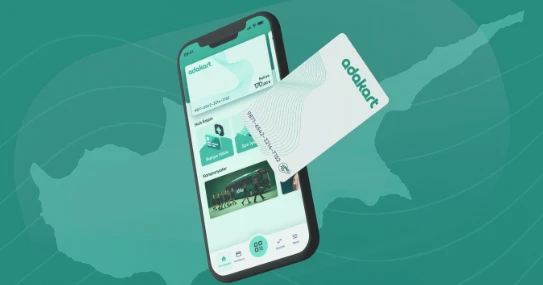
Ada Kart in Northern Cyprus is a cashless payment system for bus travel: you can use a physical Ada Kart card or pay via smartphone (QR/NFC — depending on the equipment on the route). The card costs 100 TL as of January 1, 2026; top-ups can be made via PayPoint terminals (kiosks) and/or through the app (availability of online top-ups depends on the feature and route). On some routes, cash is gradually being phased out, so it is advisable to obtain a card or app in advance.
- What is Ada Kart
- Payment Methods
- How to Start Using
- Where to Top Up
- Cost and Important Details
- Useful Tips
- Glossary
- Frequently Asked Questions
What is Ada Kart
Ada Kart (Adakart) is a transport system for cashless payment on Northern Cyprus. Typically, it includes:
- Plastic card (prepaid, rechargeable);
- Mobile payment via app (QR or NFC — depending on the terminal in the bus).
- Adakart on Google Play
- Adakart on the App Store
Official help center: help.adakart.net.
Payment Methods
1) Physical Ada Kart
Plastic card: you buy it, top up the balance, and tap it on the reader in the bus.
2) Smartphone Payment
Plastic-free option: payment through the app (QR code or NFC — depending on the specific bus/route).
How to Start Using
Steps
- Obtain an Ada Kart card or install the app and register (following instructions from the official help center).
- Top up your balance: via a PayPoint terminal, in the app, or on the website.
- When boarding the bus, pay: tap the card on the terminal or use the QR/NFC in the app.
- If the terminal does not work, try again and check your balance; if needed, pay using an alternative method accepted by the driver/route.
Where to Top Up

To find the nearest top-up points, usually a map of PayPoint terminals (kiosks) and geo-search in PayPoint services is used:
- PayPoint Kiosk Map: PayPoint — Ödeme Noktaları.
If you use top-ups via the Ada Kart app, note that online top-up availability may depend on the card status, route, and current system settings.
Cost and Details
| Item | Price | Comment |
|---|---|---|
| Issuing an Ada Kart | 100 TL | From January 1, 2026 |
| Top-up | Depends on the amount | Mostly via PayPoint kiosks/terminals; online top-up in the app may not be available in all scenarios. |
You can also buy the card directly from the driver. As a rule, the price of the card itself remains the standard one, but the total amount when buying it on the bus may be higher because the fare for your trip is processed together with the card. The “card + fare” total may vary depending on the route and the carrier’s tariff.
Useful Tips
- Get the card in advance: cash is gradually being removed on some routes, so without a card/app it may be inconvenient.
- Keep a small reserve: in case there is no nearby PayPoint kiosk or the terminal temporarily does not work.
- Check your balance: it's more convenient to top up in advance, especially before evening or weekend trips.
- QR/NFC screenshot: bus connection may be unstable — open the required screen in the app beforehand.
If you travel frequently and need mobile internet for apps/cards, a travel eSIM can sometimes be convenient: Drimsim.
If public transport is no longer running (often after 7–8 PM) and you need a backup option, you can compare transfers: KiwiTaxi or GetTransfer.
Glossary
- Ada Kart (Adakart) — a cashless payment system on Northern Cyprus using a card or smartphone.
- PayPoint — a network of terminals/kiosks and payment services often used to top up transport cards and pay for services.
- QR code — a method of payment/verification via displaying a code on a smartphone screen.
- NFC — contactless payment by "tapping" a smartphone on a terminal.
Frequently Asked Questions
Can I pay cash without an Ada Kart?
Depends on the route and operator: the system is being gradually implemented, so on some lines cash may be accepted, while on others payment is transferred to card/smartphone.
Where to top up Ada Kart
Mostly via PayPoint terminals (kiosks). The nearest points are usually found via the PayPoint map on the website or in their services.
How to avoid overpaying for the card
Check the official Ada Kart price/announcements and obtain the card via standard channels, not "from hand to hand." If a driver offers the card at a noticeably higher price, clarify an alternative purchase/registration method according to the official instructions.
What to do if there is no PayPoint kiosk nearby
Plan top-ups in advance (for example, near work/home) or use the app top-up if this feature is available for your account and card type.
Author

I am a person who is not afraid to change life when my heart tells me that something greater lies ahead. I am originally from Belarus. I have journeyed from pedagogical and economic education to the financial sector and many years of work in logistics — a world where everything moves, changes,…
You may also be interested in:
- Electric scooter and e-bike rental in Northern Cyprus
- How to Get from Kyrenia — Alsancak — Lapta and Back: Buses, Schedule, Price
- How to Get from Kyrenia to Karşıyaka, Geçitköy, Çamlıbel, Maviköşk and Back: Buses, Schedule, Price
- Driving licences in Northern Cyprus — fees and rules
- Driving from Northern Cyprus to the Republic of Cyprus